
Information Asset Registers, Data Asset Registers and Microsoft Purview
Compare Information Asset Registers (IAR), Data Asset Registers (DAR) and Enterprise Data Catalogues, including a practical Microsoft Purview approach to maintaining governed registers and history.
I have written this approach because, in practice, I often see Information Asset Registers, Data Asset Registers and Enterprise Data Catalogues treated as though they are the same thing. They are related, but they serve different purposes.
At one end, an Information Asset Register or Data Asset Register can become little more than a compliance spreadsheet that is updated periodically but provides limited value to the people trying to understand, govern and use data. At the other end, an organisation can implement an Enterprise Data Catalogue and assume that because the technology discovers thousands of technical assets, the catalogue can simply replace its existing Registers.
I do not think either approach is particularly helpful.
This is my practitioner approach, developed from my own knowledge, skills and experience working with Microsoft Purview, data governance, information governance and federated governance models. It is not intended to replace Microsoft guidance, legislation, ISO standards or an organisation's own policies and controls.
Use the Enterprise Data Catalogue to discover, understand and maintain current metadata about the data estate, while retaining appropriate formal Registers for accountability, history, compliance and organisational evidence.
The catalogue should make the Register easier to maintain and more valuable. The Register should not become another disconnected spreadsheet that duplicates information already available in the catalogue.
How this approach relates to existing guidance
The underlying idea of connecting formal Registers, data catalogues and privacy records is not unique to this approach. For example, the UK Government Data Ownership Model asks organisations to avoid unnecessary granularity and duplication when recording data and information assets, and to improve consistency between the Information Asset Register, data catalogue and Record of Processing Activities.
That guidance also recognises that critical data assets may be recorded in a central register or catalogue with ownership and stewardship information.
My contribution here is therefore not a claim that the idea of linking these records is new. The Data SkyLab Studio approach is a practitioner implementation pattern for doing this with Microsoft Purview, including stable Register IDs, Purview custom metadata, a Register–Purview mapping layer, Python/API integration, one-way automated synchronisation, historical governance records and exception-based review.
UK Government — Data Ownership Model
IAR vs DAR vs Enterprise Data Catalogue — quick comparison
The three concepts overlap, but their primary purposes are different. You may also see Enterprise Data Catalogue written as Enterprise Data Catalog; Microsoft uses the name Unified Catalog.
| Concept | Primary purpose | Typical content |
|---|---|---|
| Information Asset Register (IAR) | Formal controlled record of recognised Information Assets and accountability. | Owner, purpose, sensitivity, retention, risk, lifecycle and compliance context. |
| Data Asset Register (DAR) | Formal controlled record of governed Data Assets and accountability. | Data Asset Owner, stewardship, business purpose, Governance Domain, status and governance controls. |
| Enterprise Data Catalogue / Catalog (EDC) | Live discovery, search, metadata and governance environment for the data estate. | Technical metadata, FQNs, classifications, lineage, glossary relationships, Data Quality, Data Products and other catalogue metadata. |
Within this approach, Microsoft Purview Data Map and Unified Catalog support the Registers rather than automatically replacing them.
Information Asset Register
An Information Asset Register (IAR) is a controlled organisational record of Information Assets that the organisation has deliberately identified and is accountable for.
An IAR may contain information such as:
- Information Asset ID and name
- description and business purpose
- accountable owner
- stewardship or operational responsibility
- business area
- sensitivity or security classification
- retention requirements
- legal and regulatory considerations
- risks and controls
- review dates
- lifecycle status
- retirement or disposal information
An IAR is a governance concept, not a particular software product. It might be implemented using Excel, Microsoft Lists, SharePoint, Dataverse, SQL, another database or a specialist information-governance platform.
For many organisations, Microsoft Lists can be a practical progression from an Excel-based Register because it provides structured columns, permissions, views, workflow integration and versioning while remaining relatively simple to operate.
Data Asset Register
A Data Asset Register (DAR) applies a similar principle specifically to Data Assets.
Within the Data SkyLab Studio approach, the DAR records Data Assets that the organisation has deliberately recognised as requiring governance and accountability.
It should not automatically become a copy of every technical object discovered across the estate. Microsoft Purview may discover databases, schemas, tables, views, columns, files, folders, Databricks assets, Microsoft Fabric assets, Power BI assets and other supported technical resources. That does not mean every discovered object needs its own formal DAR record.
The organisation still needs to determine the appropriate governance granularity.
Discovery does not equal governance, and discovery does not automatically equal formal registration.
Enterprise Data Catalogue
An Enterprise Data Catalogue (EDC) serves a different purpose. Its role is to help an organisation discover, describe, connect, search and govern metadata about its live data estate.
Using Microsoft Purview Data Map and Unified Catalog as an example, this can include:
- technical Data Assets and source systems
- Fully Qualified Names and technical locations
- classifications and contacts
- business descriptions
- Glossary Terms and Critical Data Elements
- lineage
- Data Quality
- Governance Domains
- Data Products
- relationships between business and technical metadata
The catalogue is therefore dynamic. Assets may be automatically discovered, technical locations can change, metadata can be enriched and relationships may evolve over time.
Register = formal organisational record of recognised accountability and control.
Enterprise Data Catalogue = live discovery, metadata and governance environment.
I would therefore not normally replace an IAR or DAR simply because the organisation has implemented Microsoft Purview or another Enterprise Data Catalogue. I would use the catalogue to support, maintain and enrich the Register.
Legal, regulatory and compliance context
The terms Information Asset Register, Data Asset Register and Enterprise Data Catalogue do not themselves create a particular legal status. What matters is the legal, regulatory, contractual or organisational requirement being satisfied.
Registers and inventories may help support areas such as:
- UK GDPR accountability
- Records of Processing Activities (ROPA)
- information-security management
- ISO/IEC 27001 controls and evidence
- privacy information management
- records management
- retention and disposal
- internal and external audit
- regulatory assurance
- operational resilience
- contractual obligations
- sector-specific regulation
It would therefore be misleading to say simply that “GDPR requires an IAR” or “ISO requires a Data Asset Register”. The organisation needs to understand the specific record, inventory or evidence required and then determine how an IAR, DAR, Enterprise Data Catalogue or another system can support that requirement.
ROPA is not the same as an IAR or DAR
A Record of Processing Activities (ROPA) records processing activities involving personal data. A Data Asset Register records Data Assets. An Information Asset Register records Information Assets.
These records may be related, but they are not interchangeable.
For example, an Employee Payroll Processing activity may use Employee Master Data, Payroll Data, Bank Details, Tax Data and Pension Data. One processing activity may therefore involve several Data Assets, while one Data Asset may support several processing activities.
I would model ROPA ↔ Data Asset as a relationship rather than treating one as a replacement for the other.
More than one Register can be appropriate
I do not believe organisations should automatically force every governance, privacy, security and data-management requirement into one enormous Register.
There may be good reasons to maintain separate:
- Information Asset Register
- Data Asset Register
- ROPA
- records-management Register
- risk or control Register
- other specialist Registers
They can share identifiers and information without becoming the same record. The important questions are why each Register exists, who owns it, what each field means, which system is authoritative, which information can be automated, which information requires a governance decision, and how the Registers are related.
Register and Extended Register
Within my approach, I find it useful to distinguish between a Register and an Extended Register.
This helps avoid two common problems: a Register that contains so little information that it provides almost no practical governance value, or a Register containing so much technical metadata that business users cannot understand or maintain it.
The Register
The Register is the formal controlled organisational record. For a Data Asset, it might contain:
- Register Asset ID
- Data Asset name
- business description and business purpose
- accountable Data Asset Owner
- stewardship arrangement
- responsible business area
- Governance Domain
- sensitivity or classification
- lifecycle and governance status
- date registered and review date
- retirement date
- relevant compliance considerations
- governance approval information
The Register should remain understandable to the business and governance community.
The Extended Register
The Extended Register contains richer technical and operational governance context, for example:
- Unified Catalog Data Asset ID
- Data Map Asset ID
- FQN
- source system and platform
- database, schema and technical object
- asset type
- classifications
- Glossary relationships
- Critical Data Elements
- Data Quality
- lineage
- Governance Domain relationships
- Data Product associations
- technical contacts
- scan information
- last discovered or refreshed date
Register = what the organisation has formally recognised and is accountable for.
Extended Register = the richer technical and governance context surrounding that formal record.
Use a stable organisational Register ID
I would not use an FQN, table name or database location as the permanent identity of a registered Data Asset. Technical resources move, databases are migrated, schemas change and tables are renamed.
Instead, the Register should create a stable organisational identifier such as DAR-00001247 or IAR-00000432. That identity should survive changes to the technical implementation.
A record might therefore contain:
- Register Asset ID: DAR-00001247
- Unified Catalog Data Asset ID: UUID
- Data Map Asset ID: UUID
- Current FQN: server/database/schema/table
Using Microsoft Purview custom metadata for Register IDs
One practical way of connecting Microsoft Purview to the formal Register is to record the organisational Register ID as custom metadata against the relevant Purview asset.
For example:
Data Asset Register ID: DAR-00001247
or:
Information Asset Register ID: IAR-00000432
This provides a visible reference between the Enterprise Data Catalogue and the organisation's Register and can also make API-based comparison and reconciliation easier.
For example:
Microsoft Purview asset — Data Map Asset ID: <UUID>; FQN: finance/database/customer; Custom metadata: DAR ID = DAR-00001247 → Data Asset Register: DAR-00001247 — Customer Master Data
Custom metadata does not replace the mapping layer
I would not make the custom metadata field the entire relationship model.
A business Data Asset may be represented by several technical assets. For example, DAR-00001247 — Customer Master Data could relate to a SQL Customer table, a Databricks Gold Customer table, a reference dataset and a Fabric semantic model.
Those assets could all carry DAR ID = DAR-00001247 as custom metadata. However, I would still maintain a separate Register–Purview Asset Mapping because relationships may need effective dates, historical records, approvals, migration tracking, retirement tracking and one-to-many relationships.
Register ID = stable organisational identity
Purview custom metadata = convenient visible reference to that identity
Register–Purview Asset Mapping = controlled relationship between the governed asset and its technical representations
One registered Data Asset does not necessarily equal one Purview asset
I would avoid assuming that one Register record equals one database table.
A registered Data Asset may represent a broader business concept implemented through several technical resources. For example:
Customer Master Data → SQL source table → Databricks curated table → Fabric semantic model → Power BI reporting
The formal Data Asset can remain DAR-00001247 — Customer Master Data while the mapping layer connects it to the relevant Purview Data Assets.
This keeps the business governance concept separate from its technical implementation.
History matters
Within the Data SkyLab Studio approach, the Register should preserve the history of governance-significant changes.
This is a governance design principle rather than a claim that every law requires every previous value to be retained indefinitely.
Microsoft Purview itself also provides Data Map history for supported changes to assets and other governance objects. That is useful operational and catalogue history, including information about what changed, who made the change and when.
I would still treat that separately from Register Change History. Purview history records changes in the catalogue; the Register history records the organisation's governance-significant decisions and accountability over time, such as when ownership formally transferred, why the change was made, who approved it and when it became effective.
Purview Data Map history = catalogue and operational change history.
Register Change History = formal governance decision and accountability history.
This distinction is also important because Microsoft currently documents Data Map history as a preview capability with defined retention periods. I would therefore not make the organisation's long-term governance evidence dependent on the catalogue history feature alone.
Microsoft Learn — Microsoft Purview Data Map history
Governance-significant changes might include:
- accountable owner
- stewardship
- business purpose
- Governance Domain
- classification or sensitivity
- lifecycle status
- registration status
- retirement
- authoritative source
- approval decisions
For example:
Owner: Finance Director
Effective From: 01 April 2026
Effective To: 09 October 2026
Owner: Head of Finance Data
Effective From: 10 October 2026
Effective To: Current
This means the organisation can answer not only who owns the asset today?, but also who was accountable for it six months ago? and when and why did that accountability change?
Microsoft Lists and history
Microsoft Lists can be a useful platform for implementing a Register. However, I would not rely only on ordinary list version history for long-term governance evidence.
A stronger pattern is:
Current Register
plus
Register Change History
The history store records governance-significant changes such as the Asset ID, field changed, previous value, new value, effective date, changed by and reason for change.
This creates a clearer audit trail of material governance decisions.
Using Microsoft Purview to maintain the Register
My approach is not:
Export Microsoft Purview into Excel and call that the Register.
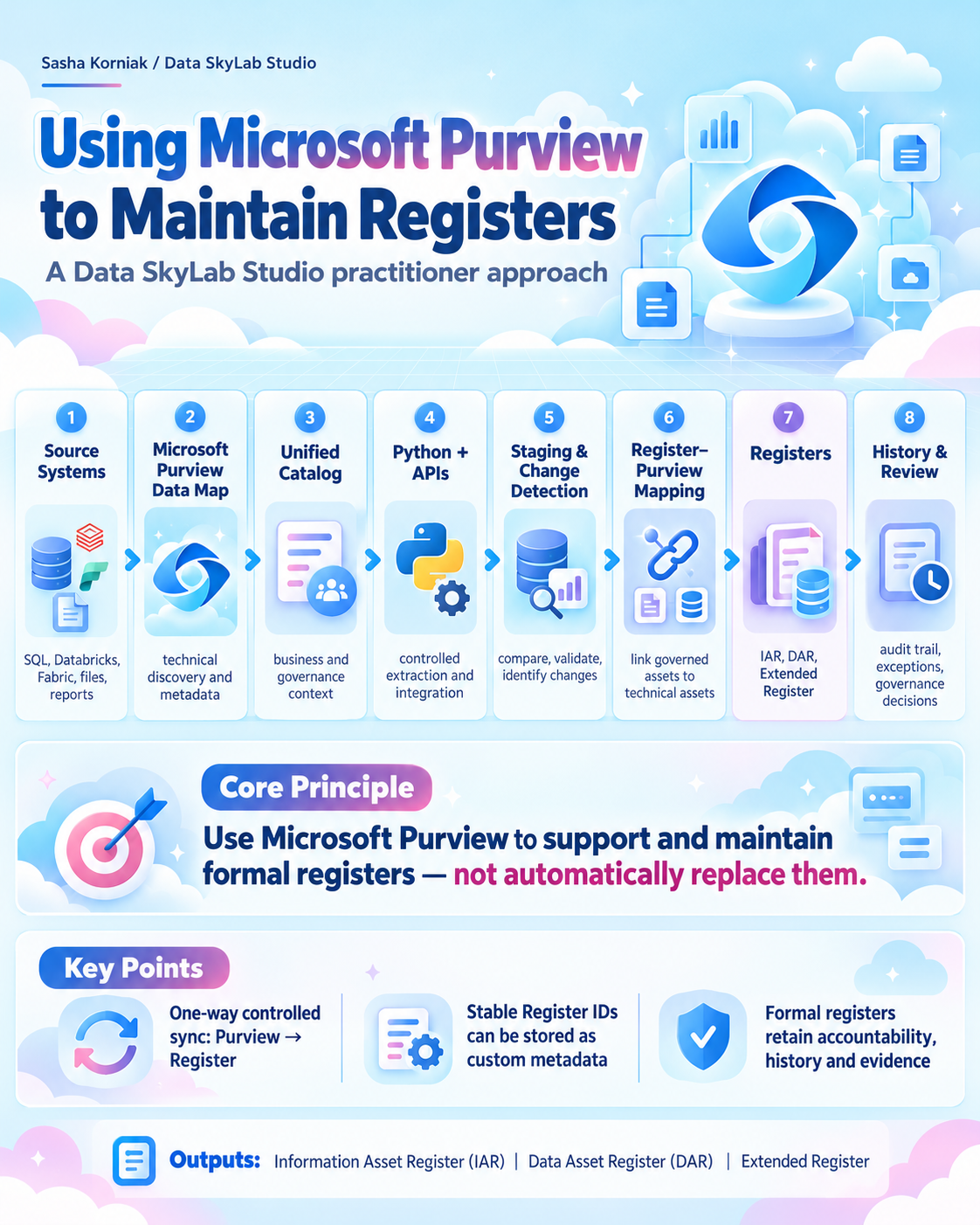
Instead, Microsoft Purview becomes an upstream source of live metadata. A controlled integration can then use that metadata to maintain or enrich one or more formal Registers.
The architecture is:
Source Systems → Microsoft Purview Data Map — technical discovery, metadata and lineage → Microsoft Purview Unified Catalog — business and governance context → Unified Catalog REST APIs + Data Map APIs/SDK → Python integration → Staging and change detection → Register–Purview Asset Mapping → Data Asset Register / Information Asset Register / Extended Register / other appropriate Registers → History + exception management + governance review
Python and the Microsoft Purview APIs
I would use Python to retrieve the required metadata from Microsoft Purview.
Depending on the information required, this could involve the Microsoft Purview Unified Catalog REST APIs and the Microsoft Purview Data Map APIs or SDK.
The Python integration would extract selected metadata, transform it into the required format and load it into a staging area before any formal Register update is made.
I would not write raw API results directly into the formal Register.
Use a staging and comparison layer
The integration should follow a controlled process:
Purview API → Python extraction → Staging dataset → Compare with current Register → Apply governance rules → Update / create / flag an exception
This allows the organisation to distinguish technical changes, governance changes, new discoveries, conflicts and assets requiring human review before the formal Register is changed.
Automated synchronisation should be one-way
The routine automated integration should be:
Microsoft Purview → Register
not:
Microsoft Purview ↔ Register
I would not allow somebody to change a value in Excel or Microsoft Lists and have that automatically overwrite Microsoft Purview.
Bidirectional synchronisation immediately creates difficult questions: Which system is authoritative? Which change wins? Was the change deliberate? Could an old historical value overwrite current metadata? Could a Register administrator accidentally alter live governance metadata?
No uncontrolled reverse synchronisation.
Controlled updates back into Purview
There are legitimate circumstances where information originating from the governance process needs to be written into Purview. The Register ID is a good example.
A possible process is:
- Purview discovers the technical asset.
- Governance decides whether it represents or contributes to a formally governed Data Asset.
- The Data Asset is accepted into the DAR.
- The Register creates DAR-00001247.
- The approved Register ID is written to the appropriate Purview asset or assets as custom metadata.
- Future synchronisation uses that ID for reconciliation.
This is not uncontrolled bidirectional synchronisation. It is a controlled governance action.
The routine automated flow remains Purview → Registers, while approved identifiers and corrections can be written into Purview through a separate controlled process.
Ownership should not be blindly copied from Purview
Microsoft Purview can contain multiple contact or ownership values. My governance approach expects a governed Data Asset to have one clearly accountable Data Asset Owner.
Therefore I would not automatically use:
first Purview Owner found → Register Owner
Instead:
Purview ownership/contact metadata → candidate or comparison information → governance validation → formal accountable Data Asset Owner
This ensures automation supports governance decisions rather than making them.
Define authority field by field
Each field should have a clearly defined authoritative source.
| Information | Typical authoritative source |
|---|---|
| Register Asset ID | Register |
| Business purpose | Business / governance process |
| Accountable Data Asset Owner | Formal governance decision |
| Stewardship arrangement | Governance process |
| Unified Catalog ID | Microsoft Purview |
| Data Map ID | Microsoft Purview |
| FQN | Microsoft Purview |
| Technical location | Microsoft Purview |
| Asset type | Microsoft Purview |
| Classification | Purview where appropriate |
| Glossary relationship | Unified Catalog |
| CDE relationship | Unified Catalog |
| Data Product association | Unified Catalog |
| Lineage | Purview / Data Map |
| Formal registration date | Register |
| Historical ownership | Register Change History |
| Retirement approval | Governance process |
This prevents the technical integration from accidentally becoming governance policy.
Change-detection synchronisation
I would describe the automated process as change-detection synchronisation.
Retrieve current Purview metadata → Compare against previously stored state, timestamps or hashes → Identify new, changed or missing records → Process only the differences
This provides incremental behaviour within the integration without assuming that every Purview API provides a native delta feed.
Recommended synchronisation cadence
This is a Data SkyLab Studio recommended starting point, not a Microsoft, ISO or legal requirement.
Daily — change detection
Run after the relevant Purview scanning and refresh processes. Identify newly discovered assets, metadata changes, ownership differences, classification changes, relationship changes and missing assets.
Weekly — reconciliation
Compare Purview and the Registers more broadly. Look for discovered but unregistered assets, registered but no longer discovered assets, broken mappings, duplicate mappings, stale metadata and failed synchronisation.
Monthly — governance exception review
Review missing ownership, stewardship gaps, classification conflicts, assets awaiting registration, lifecycle changes, retirement candidates, Data Product readiness and governance baseline failures.
For slower-moving estates, weekly synchronisation may be enough. For highly dynamic estates, it may need to run more frequently. The important point is that the integration frequency should make sense relative to the frequency at which the underlying Purview metadata actually changes.
Using one Purview environment with several Registers
A single Microsoft Purview environment can potentially provide selected metadata to several controlled records.
Microsoft Purview → Python / staging / mapping → Data Asset Register | Information Asset Register | Extended Register
Where appropriate, selected metadata may also support a ROPA or other compliance records. This does not mean each destination receives the same data. Each Register retains its own purpose and authority.
Exception reporting
This is where I believe the model becomes significantly more useful than a traditional static spreadsheet.
Discovered in Purview but not registered
Potential new Data Asset requiring governance assessment.
Registered but not found in Purview
Possible migration, retirement, deletion, technical change or scanning problem.
Ownership differs
Governance review required.
No accountable owner
Accountability gap.
No stewardship arrangement
Governance gap.
Classification materially changed
Risk or compliance review.
Data Product association exists but governance baseline is incomplete
Potential Data Product readiness issue.
Technical location changed
Possible migration or architectural change.
The Register can therefore become part of an active governance control system instead of being reviewed only periodically.
Relationship to Microsoft Purview Data Products
This approach connects directly with my wider Microsoft Purview Data Asset and Data Product model.
Discovered → Business Accountability Identified → Accountable Data Asset Owner Identified → Stewardship Established → Governance Baseline Met → Data Product Ready → Associated with one or more Data Products → Continuously Governed
The Register records the formal governance state. The Extended Register connects that state with the richer metadata available through Microsoft Purview. Unified Catalog then provides the business-facing Data Product context.
Association with a Data Product does not transfer ownership of the underlying Data Asset.
The Data SkyLab Studio model
Microsoft Purview tells us what exists and what the catalogue currently knows about it.
Governance determines what matters, how it should be governed and who is accountable.
The Register records that formal accountability and organisational decision.
The Extended Register connects the formal record to richer technical and governance metadata.
The Register gives the Data Asset its stable organisational identity; Microsoft Purview provides the live metadata and technical context around that identity.
Custom metadata in Microsoft Purview can carry the organisational Register ID, making the relationship visible and easier to reconcile.
A Register–Purview mapping layer allows one governed Data Asset to relate to one or more technical assets without assuming that a Data Asset is simply a database table or file.
Python-based API integration performs controlled one-way change-detection synchronisation from Microsoft Purview into the Register environment.
Approved Register identifiers and corrections may be written into Purview through a separate controlled governance process rather than unrestricted reverse synchronisation.
Governance-significant changes are historically retained so that accountability and material decisions can be reconstructed over time.
An organisation may maintain an IAR, DAR, ROPA and other Registers simultaneously where they serve different purposes, linking them rather than forcing everything into one oversized Register.
Final principle
The objective is not to decide between having a Register or an Enterprise Data Catalogue. It is to make them work together.
The Enterprise Data Catalogue provides the live evidence.
The Register provides the formal accountability and history.
The Extended Register connects the two.
That is the core of the Data SkyLab Studio approach.
Frequently asked questions
What is the difference between an Information Asset Register and a Data Asset Register?
An Information Asset Register records formally recognised Information Assets, while a Data Asset Register focuses specifically on governed Data Assets. They may share information and identifiers, but they do not have to be the same Register.
What is the difference between a Data Asset Register and an Enterprise Data Catalogue?
A Data Asset Register is a controlled organisational record of formally recognised Data Assets and accountability. An Enterprise Data Catalogue is a live discovery, metadata and governance environment. The catalogue can help maintain the Register, but discovery in the catalogue does not automatically equal formal registration.
Can Microsoft Purview replace an IAR or DAR?
Not automatically. Within this approach, Microsoft Purview Data Map and Unified Catalog provide live metadata and governance context that can be used to maintain or enrich an IAR, DAR or Extended Register. The formal Register retains its own purpose, controls and history.
Can Microsoft Lists be used for an Information Asset Register or Data Asset Register?
Yes. Microsoft Lists can be a practical implementation option where its permissions, structure, workflow, audit and retention capabilities meet the organisation's requirements. I would still keep a deliberate history of governance-significant changes rather than relying only on the current row values.
Is a ROPA the same as an Information Asset Register or Data Asset Register?
No. A Record of Processing Activities (ROPA) records personal-data processing activities. IARs and DARs record assets. A processing activity may use several Data Assets, and a Data Asset may support several processing activities, so I would model the relationship rather than treat them as substitutes.
How should Microsoft Purview update a Register?
My preferred pattern is a controlled one-way automated flow from Microsoft Purview into a staging and comparison layer, then into the appropriate Register. Approved Register identifiers or corrections can be written back to Purview through a separate controlled governance process rather than unrestricted bidirectional synchronisation.
Can one registered Data Asset map to several Microsoft Purview assets?
Yes. A governed business Data Asset may be represented by several technical assets. A stable Register ID, Purview custom metadata and a separate Register–Purview mapping layer can be used together to manage that relationship.
Official references
Related learning
- Start Here: Microsoft Purview Data Products, Data Assets and Ownership
- What Is a Microsoft Purview Data Product? — Data SkyLab Studio Definition
- Data Asset, Information Asset, Dataset and Microsoft Purview Data Asset
- Microsoft Purview Data Asset Ownership Policy
- How to Identify a Microsoft Purview Data Asset Owner — Guidance
- Microsoft Purview Data Asset Ownership Decision Tree
Learning with Data SkyLab Studio
Follow practical Microsoft Purview and Data Governance learning from Data SkyLab Studio on YouTube.