
Microsoft Purview Unified Catalog: Enterprise and Local Glossary Terms Governance Model
Read a practical Microsoft Purview Unified Catalog model for adding semantic business meaning to technical metadata, governing enterprise and local terminology, and reusing authoritative Glossary Terms at scale.
The accompanying 10 Mins Learning video explains what a Microsoft Purview Glossary Term is and how it connects technical data to recognised business language. The core idea is simple: technical metadata tells us what and where the data is; semantic metadata tells us what the data means to the organisation.
Glossary Terms provide the semantic layer
Technical systems often use abbreviated or platform-specific names such as cust_id or DOB. These names may be clear to developers, engineers or database administrators, but they are not always meaningful to data consumers.
A Glossary Term gives that technical data an agreed business meaning. For example, cust_id can be associated with Customer Identifier, supported by an agreed definition explaining exactly what that concept means to the organisation.
That same business concept can then be related to different technical representations across systems. A CRM platform, sales application and data warehouse may use different field names, while the Glossary Term provides the consistent semantic meaning across all of them.
Technical metadata versus semantic metadata
Technical metadata can tell us:
- What a field or asset is called.
- Its data type or schema.
- Which source system it comes from.
- Where it is stored.
Semantic metadata explains:
- What the data means in business language.
- How the organisation interprets the concept.
- The agreed definition.
- Who owns or governs the meaning.
- Which related concepts, synonyms, acronyms or policies apply.
Microsoft Purview Glossary Terms provide this business-facing semantic layer and can be related to Data Products, Data Assets, columns, Critical Data Elements and other Glossary Terms.
Governance Domains and Glossary Terms solve different problems
Governance Domains answer: who owns and governs the meaning?
Glossary Terms answer: what does the data mean?
The Governance Domain provides the ownership and governance boundary. The Glossary Term provides the shared business meaning. Together they connect organisational accountability with consistent interpretation of data.
This is particularly important in a federated model: different business areas can own their governance responsibilities while still sharing agreed terminology across the enterprise.
What a Glossary Term can contain
A Glossary Term is more than a name and definition. Depending on how the organisation configures and governs it, a term can include:
- Definition
- One or several owners
- Experts or subject-matter contacts
- Acronyms
- Synonyms
- Related terms
- Parent or child relationships
- Resources and supporting documentation
- Custom attributes
- Policies
- Relationships to Data Products, Data Assets, columns and Critical Data Elements
The Enterprise Glossary is the discovery view
Glossary Terms are created and governed within individual Governance Domains. Once published, they are brought together in the Enterprise Glossary so users can search and browse the organisation's published business language without navigating through every Governance Domain separately.
Users can search, sort and filter published terms and inspect their definitions, ownership, governance information, related concepts and connections to governed data. Parent and child relationships can also be explored as a hierarchy.
Duplicate names: technically possible, usually poor governance
Microsoft Purview can warn when a user creates or renames a Glossary Term using a name that already exists, but it does not necessarily block the duplicate. This makes governance discipline important.
Multiple terms called Customer may be legitimate where Sales, Marketing and Regulatory functions genuinely mean different things. However, unnecessary duplicates make it harder for consumers to identify the authoritative definition and know which term should be associated with governed data.
The governance objective should therefore be to create a clear authoritative term for a shared business meaning and only create a separate local term where the meaning is genuinely different.
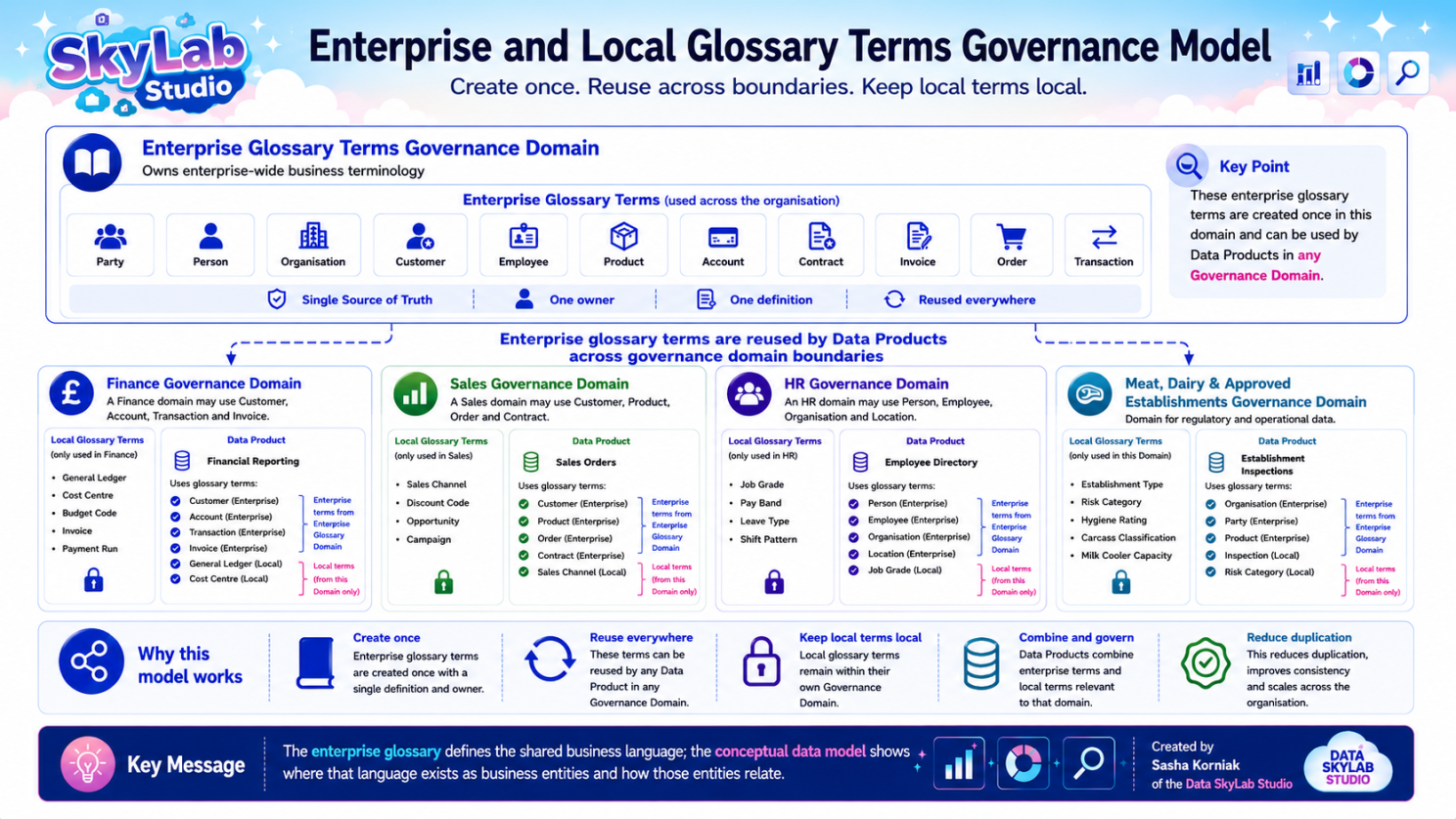
Enterprise and Local Glossary Terms Governance Model
This leads to the scalable implementation pattern used by Data SkyLab Studio:
Create enterprise business terminology once, reuse it across the organisation, and keep specialist business terminology within the Governance Domain that owns it.
Implementation pattern: an Enterprise Glossary Terms Governance Domain is an enterprise governance design pattern rather than a special Microsoft Purview Governance Domain type.
Step 1 — Create an Enterprise Glossary Terms Governance Domain
Create a dedicated Governance Domain for terminology that is genuinely shared across the organisation, for example:
Enterprise Glossary Terms
This becomes the authoritative governance location for shared concepts such as:
- Party
- Person
- Organisation
- Customer
- Employee
- Product
- Account
- Contract
- Invoice
- Order
- Transaction
Each enterprise term should have an agreed business definition, clear accountable ownership, an authoritative maintenance location and useful relationships to the governed data that represents the concept.
Step 2 — Create Business Governance Domains
Create Governance Domains that reflect the organisation's real governance boundaries, for example:
- Finance
- Sales
- Human Resources
- Meat, Dairy & Approved Establishments
Each business Governance Domain remains responsible for its own Data Products, specialist Local Glossary Terms, stewardship and governance decisions.
Step 3 — Keep Local Glossary Terms local
Not every term should be promoted into the Enterprise Glossary Terms Governance Domain. Terms that are meaningful only within one business context should normally remain within the Governance Domain that owns that context.
Finance examples
- General Ledger
- Cost Centre
- Budget Code
- Payment Run
Sales examples
- Sales Channel
- Campaign
- Opportunity
- Discount Code
Human Resources examples
- Job Grade
- Leave Type
- Shift Pattern
- Pay Band
Meat, Dairy & Approved Establishments examples
- Establishment Type
- Hygiene Rating
- Carcass Classification
- Milk Cooler Capacity
These terms remain locally governed because their meaning is specialist to that business area. Once published, they are still discoverable through the Enterprise Glossary.
Step 4 — Create Data Products in the owning Governance Domain
- Finance: Financial Reporting
- Sales: Sales Orders
- Human Resources: Employee Directory
- Meat, Dairy & Approved Establishments: Establishment Inspections
A Data Product provides the business representation of related Data Assets organised around a defined use case.
Step 5 — Reuse Enterprise Glossary Terms
When a Data Product uses a business concept that already exists as an authoritative enterprise term, reuse that term rather than recreating the same definition locally.
Financial Reporting
- Customer
- Account
- Transaction
- Invoice
Sales Orders
- Customer
- Product
- Contract
- Order
Employee Directory
- Person
- Employee
- Organisation
Establishment Inspections
- Organisation
- Party
- Product
Create once. Reuse many times.
Step 6 — Add Local Glossary Terms where specialist context is needed
- Financial Reporting: General Ledger, Cost Centre
- Sales Orders: Sales Channel
- Employee Directory: Job Grade
- Establishment Inspections: Inspection, Risk Category
This allows a Data Product to combine enterprise business language with the specialist local terminology needed to explain its use case.
Who does what?
Data Governance Professionals
- Define the enterprise glossary governance standard.
- Agree the criteria for deciding whether a term is enterprise or local.
- Define naming, ownership, lifecycle, policy and duplication rules.
- Resolve disputes where different Governance Domains use competing definitions.
Data Stewards
- Create and maintain Glossary Terms in Microsoft Purview.
- Maintain definitions, owners, experts, synonyms, acronyms, resources and related terms.
- Publish, unpublish, move or expire terms as required.
- Link terms to Data Products, Data Assets, columns and Critical Data Elements where they have the required Purview permissions.
Data Architecture Professionals
- Connect Glossary Terms to the Conceptual Data Model and wider information architecture.
- Identify which Data Assets and columns represent each business concept.
- Resolve technical naming differences and synonyms across source systems.
- Help distinguish the enduring business concept from platform-specific names and schemas.
- Work with Data Stewards and Governance Professionals when source or model changes affect glossary mappings.
Data Product Owners
- Ensure each Data Product uses the correct enterprise and local business concepts.
- Work with Stewards to ensure Glossary Term relationships accurately describe the Data Product's use case.
- Avoid unnecessary duplicate terminology when an authoritative enterprise term already exists.
Relationship with the Conceptual Data Model
The Enterprise Glossary answers:
What business concepts does the organisation use?
The Conceptual Data Model answers:
How are those business concepts related?
For example, the glossary can define Customer, Order and Product, while the Conceptual Data Model describes relationships such as a Customer placing an Order and an Order containing a Product.
Data Architecture Professionals then help map these enduring business concepts to the Data Products, Data Assets, Critical Data Elements and columns that physically represent them across the technical estate.
Microsoft Purview implementation steps
- Create a Governance Domain called Enterprise Glossary Terms as the organisation's chosen enterprise terminology boundary.
- Create enterprise-wide Glossary Terms within that Governance Domain.
- Assign clear accountable ownership.
- Add useful acronyms, synonyms, related terms, resources and custom attributes.
- Create business Governance Domains that reflect the organisation.
- Create Local Glossary Terms only where terminology is genuinely specialist to that Governance Domain.
- Create Data Products within their owning Governance Domains.
- Relate authoritative Enterprise Glossary Terms to governed data wherever the same business meaning applies.
- Relate Local Glossary Terms where specialist context is required.
- Where appropriate, link terms to Data Products, Data Assets, columns and Critical Data Elements.
- Use the Enterprise Glossary to discover published terms across Governance Domains.
- Review duplicate names and rationalise them where multiple terms do not represent genuinely different meanings.
- Promote or rationalise terminology when a previously local concept becomes shared across the enterprise.
Key principle
Create once. Reuse everywhere. Keep local terms local.
Governance Domains organise ownership. Glossary Terms connect meaning. Together they allow Microsoft Purview Unified Catalog to connect business context with governed data across the enterprise.
Learning with Data SkyLab Studio
Follow practical Microsoft Purview and Data Governance learning from Data SkyLab Studio on YouTube.